

Custom DTF Transfers No Minimum Order: 2026 Guide
Editorial TeamTable of Contents
- Why Custom DTF Transfers No Minimum Order Change Small-Batch Apparel
- How to Order Custom DTF Transfers in 5 Steps
- Custom DTF Gang Sheets vs. DTF Transfers by Size
- DTF Transfer File Requirements and Gang Sheet Setup
- DTF Transfer Pricing by Order Size
- How to Apply DTF Transfers: Temperature, Pressure, and Troubleshooting
- Wash Durability, Fabric Compatibility, and Print Quality
- Conclusion
- Frequently Asked Questions
Last Updated: October 20, 2026
Why Custom DTF Transfers No Minimum Order Change Small-Batch Apparel
Custom DTF transfers no minimum order remove the biggest barrier in apparel decoration: inventory risk.
That shift matters because direct-to-film printing has moved from a niche alternative to a mainstream decoration method. It prints full-color artwork onto a film carrier, cures it with adhesive powder, and transfers under heat.
At DTF 2 Print, we built our whole ordering model around this reality: no minimum quantity requirements, gang sheets you assemble yourself, and free shipping on orders over $100.
How to Order Custom DTF Transfers in 5 Steps
The ordering process takes about ten minutes once your artwork is ready. Here is the workflow we recommend to every new customer.
- Prepare your artwork. Export at 300 DPI with a transparent background, sized to your final print dimensions.
- Choose your format. Order DTF transfers by size for single designs, or build a gang sheet to combine multiple designs on one sheet.
- Upload and lay out. Use our online builder to place each design, checking spacing between images so nothing overlaps.
- Review the proof. Confirm sizes, quantities, and color placement before submitting. Files print exactly as uploaded.
- Press and ship. Transfers arrive ready-to-press, shipped fast or available for local pickup in Van Alstyne, TX.
If your file is already laid out, upload your DTF gang sheet directly and skip the builder entirely.


Custom DTF Gang Sheets vs. DTF Transfers by Size
Choosing between a gang sheet and a sized transfer comes down to one question: are you printing one design or many?
A gang sheet is a single film containing multiple designs arranged to maximize usable area.
Transfers by size work better when you need a specific dimension, like a 10-inch back print or a 3-inch chest logo, in a set quantity.
| Format | Best For | Layout Work | Cost Efficiency |
|---|---|---|---|
| Gang sheet | Multiple designs, mixed sizes | You arrange designs | Highest when packed tightly |
| By size | Single design, exact dimensions | None | Predictable per unit |
Our rule of thumb: if you have four or more designs going to press in the same week, build a gang sheet. If you need twenty identical back prints, order by size.
DTF Transfer File Requirements and Gang Sheet Setup
Print-ready artwork is the single biggest factor in how your transfers look. Get the file right and the rest of the process is predictable.
File specifications:
- PNG format at 300 DPI resolution
- Transparent background
- Actual print size, not scaled up after export
- Full color is fine; white ink is handled automatically
Gang sheet layout rules:
- Leave a small gap between designs so cuts stay clean
- Rotate odd-shaped artwork to fill gaps
- Group designs by garment placement to simplify pressing
- Keep all artwork inside the sheet boundary
A common mistake is exporting a design at screen resolution and stretching it to print size. The result looks soft at the edges. Set your canvas to the final dimensions first, then design inside it.
DTF Transfer Pricing by Order Size
Most no-minimum DTF shops advertise "no setup fees" and stop there. That tells you nothing about what you will actually pay.
The cost drivers, in plain terms:
- Film area. You pay for the square inches your artwork occupies, not the number of colors. A 12-inch by 12-inch design costs more than a 3-inch chest logo because it consumes more film.
- Gang sheet packing. A gang sheet is priced per sheet, not per design. Two designs on one sheet cost less per design than two designs on two sheets. Empty space on a sheet is film you already paid for.
- Setup fees. Reputable no-minimum shops charge none. If a quote includes a "screen" or "plate" fee, you are looking at a different process.
- Shipping. This is the line item buyers forget. A single small transfer can carry a shipping cost larger than the transfer itself, which is why free-shipping thresholds matter for small tests.
How the math typically breaks down:
| Order Type | What You Pay For | Cost Pattern |
|---|---|---|
| One small transfer (approx. 3 in. x 3 in.) | Individual size | Highest cost per square inch; shipping often exceeds the transfer price |
| One medium transfer (approx. 10 in. x 10 in.) | Individual size | Moderate per-square-inch cost; shipping still a large share of total |
| Gang sheet, half full | One sheet | Moderate per-design cost; wasted film raises the effective price |
| Gang sheet, tightly packed | One sheet | Lowest per-design cost; each added design spreads the sheet price thinner |
| Bulk gang sheets (multiple sheets in one order) | Per sheet | Per-design cost falls further as shipping is spread across more sheets |
A practical way to compare real per-transfer cost:
- Price your design as a single sized transfer.
- Price the same design packed onto a gang sheet with two or three others.
- Add the shipping charge to each total.
- Divide by the number of finished transfers you get.
The number that comes out of step 4 is the only figure worth comparing across shops.
Where no-minimum pricing helps most:
A three-shirt test run and a three-hundred-shirt run cost the same per transfer at a no-minimum shop, because there is no volume penalty to avoid. That is the opposite of screen printing, where short runs carry per-unit setup costs that make small batches uneconomical.
How to Apply DTF Transfers: Temperature, Pressure, and Troubleshooting
Application is where most first-timers run into trouble. The variables are few, temperature, pressure, time, and peel temperature, but each one interacts with the fabric you are pressing onto.
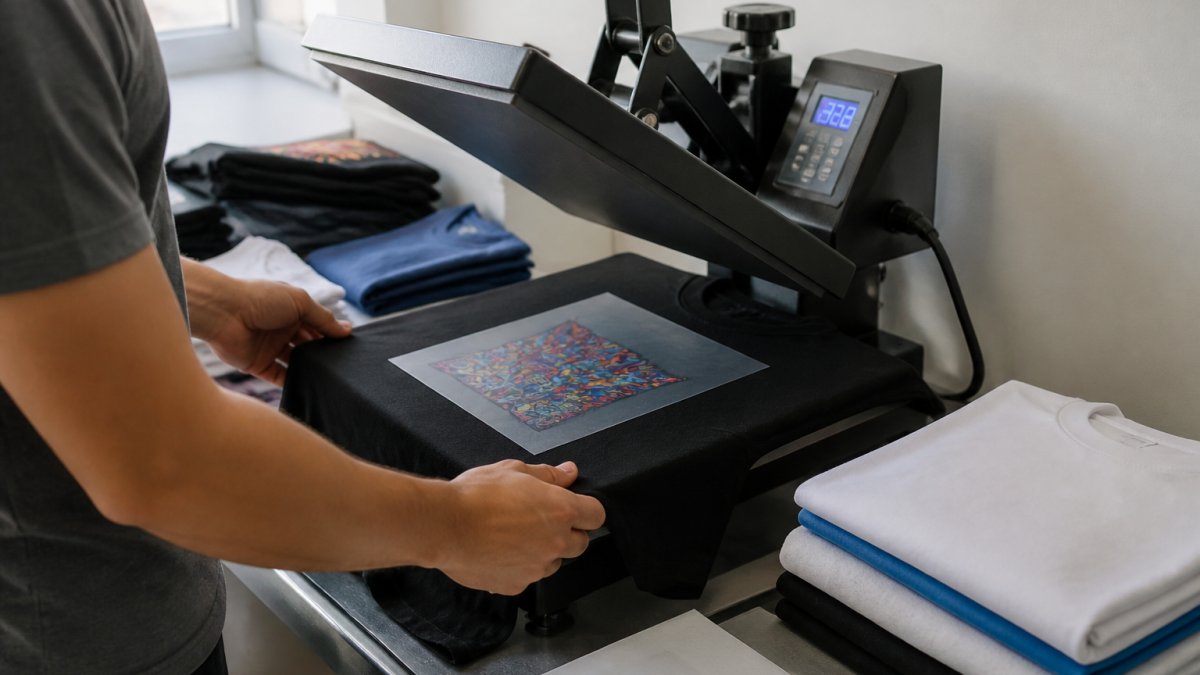
Press settings by fabric type (starting points):
| Fabric | Temperature | Pressure | Press Time | Peel |
|---|---|---|---|---|
| 100% cotton | 300-325°F | Medium-firm | 10-15 sec | Warm |
| Cotton/poly blend | 300-315°F | Medium-firm | 10-12 sec | Warm |
| 100% polyester | 285-300°F | Medium | 8-12 sec | Cold |
| Performance/athletic knit | 285-300°F | Light-medium | 8-10 sec | Cold |
| Fleece and hoodies | 300-315°F | Firm | 12-15 sec | Warm |
Lower temperatures on polyester and performance knits protect the fabric from scorching and dye migration. Higher pressure on fleece pushes the transfer into the loft so the adhesive reaches the fabric rather than sitting on top of it.
The process, step by step:
- Preheat the garment for 3-5 seconds. This drives out moisture, which is the most common cause of poor adhesion. On polyester, preheat longer, moisture trapped in synthetic fibers turns to steam under the press and lifts the transfer.
- Place the transfer printed side down against the fabric. The film carrier faces up.
- Press at full pressure for the recommended time. Light pressure is the second most common cause of edge lift.
- Peel the film in one smooth motion. Warm peel for cotton and blends; cold peel for polyester, performance knits, and fine detail.
- Cover with parchment or a Teflon sheet and press again for 5-8 seconds to lock the adhesive into the fabric.
Troubleshooting common failures:
- Transfer lifts at the edges. Pressure too light, peel too cold, or the garment was not preheated. Increase pressure, peel sooner, and add a preheat step.
- Design cracks after peeling. Under-pressed. Add 3-5 seconds to the second press and confirm pressure is firm enough to press the adhesive into the weave.
- Fabric scorching or shine. Temperature too high, especially on polyester. Drop to 285-300°F and extend time slightly to compensate.
- Patchy adhesion on polyester or performance knits. Moisture or dye migration. Preheat longer, lower the temperature, and use a cold peel.
- Fine text or small detail fills in. Peel temperature too warm or pressure too heavy. Switch to cold peel and reduce pressure slightly.
- Transfer feels stiff or plastic-like. Over-pressed. Reduce time and pressure; the finish should match the stretch of the garment, not fight it.
Wash Durability, Fabric Compatibility, and Print Quality
Properly pressed DTF transfers hold up to repeated washing. The key phrase is "properly pressed", adhesion failures almost always trace back to insufficient pressure or a cold peel, not the transfer itself.
Care instructions to pass to your customers:
- Wash inside out in cold water
- Skip fabric softener, which coats the adhesive layer
- Tumble dry low or hang dry
- Do not iron directly over the print
Fabric compatibility: DTF works on cotton, polyester, performance blends, and fleece. The American Apparel and Footwear Association tracks fabric and care labeling standards worth reviewing if you sell into retail channels.
Print quality comes down to resolution and ink. Transfers printed at 300 DPI with eco-friendly inks hold fine detail, gradients, and small text that other methods struggle with.
Conclusion
The hard part of small-batch apparel was never the design. It was the commitment: minimums, setup fees, and boxes of unsold inventory. No-minimum DTF ordering removes that risk entirely, letting you test, learn, and scale on your own terms.
DTF 2 Print exists to make that workflow simple.
Ready to stop guessing and start pressing? Build your DTF gang sheet today and turn your next design into a finished shirt this week.
Frequently Asked Questions
Where is the best place to order custom DTF transfers?
Look for a provider that prints at 300 DPI, offers no minimum order, and shows clear pricing per transfer or per gang sheet. DTF 2 Print fits those criteria: upload a ready file or build a gang sheet, get free U.S. shipping on orders over $100, and pick up locally in Van Alstyne, TX. Request a sample order first to check color accuracy and hand feel before committing to a larger run.
How much does a custom DTF transfer cost?
Pricing depends on how you order. DTF 2 Print charges $2.99 for the Upload Your DTF Gang Sheet product, $4.99 for the Build Your DTF Gang Sheet product, and the DTF Transfer By Size product starts at $0.10. Gang sheets lower your per-transfer cost because you fill the sheet with multiple designs. Ordering by size works better for single large graphics or simple reorders.
Can I combine multiple designs on a DTF gang sheet?
Yes. A gang sheet holds as many designs as fit within the sheet dimensions, and you upload them as one print-ready file. Keep at least 0.25 inches between designs so each transfer cuts cleanly, and leave a small margin at the sheet edges. Combining designs is the main reason custom DTF gang sheets cost less per piece than ordering transfers by size.
What file format and resolution should I use for a custom DTF transfer?
Upload a PNG at 300 DPI with a transparent background. Size the artwork at the exact print dimensions you want, because the file prints as submitted. Keep important detail at least 0.125 inches from the cut line. Vector-based designs exported to PNG at 300 DPI hold up best on small text and fine lines.
How do I apply a DTF transfer to a shirt?
Prepress the garment for 5-10 seconds to remove moisture. Place the transfer with the printed side down and press at 300-325°F for 10-15 seconds with medium-heavy pressure. Let it cool completely, then peel the film slowly. A second press of 5 seconds under a cover sheet improves adhesion. Always test on a scrap garment first.
How long do custom DTF transfers take to ship?
Production time varies by order size and file readiness. DTF 2 Print prints files as uploaded, so correct files move faster. Shipping within the U.S. typically adds a few business days, and orders over $100 ship free. Local pickup in Van Alstyne, TX skips shipping entirely. Ask for a production estimate before placing a deadline-critical order.
Do DTF transfers work on the same blanks as screen printing?
DTF transfers press onto cotton, polyester, blends, fleece, and performance fabrics, so most blanks you already use for screen printing work. The main difference is feel: DTF adds a thin, stretchable film layer. On very dark or heavily textured fabrics, expect slightly more hand feel than a soft-hand screen print. Test on your actual blank before a full run.