
Troubleshooting DTF Transfer Issues (Cracks, Peels, etc.)
Md Abdur RahmanDirect-to-Film printing delivers vibrant, long-lasting apparel transfers — but like any heat-applied process, small mistakes can lead to issues such as cracking, peeling, fading, or poor adhesion. The good news? Almost every DTF problem has a clear fix once you understand the cause.
This complete troubleshooting guide will walk you through the most common DTF transfer issues, why they happen, and how to prevent them so every press comes out professional and durable.
If you ever need perfectly printed transfers ready to apply, you can order from DTF 2 Print using:
-
Build a Gang Sheet: https://www.dtf2print.com/products/build-a-gang-sheet
-
Upload Your DTF Gang Sheet: https://www.dtf2print.com/products/upload-your-dtf-gang-sheet
-
DTF Transfer By Size: https://www.dtf2print.com/products/dtf-transfer-by-size
DTF Transfer Cracking After Pressing
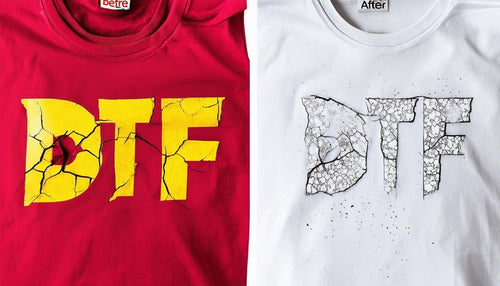

Why cracking happens:
Cracking usually means the transfer didn’t fully bond with the fabric fibers or became brittle during pressing.
Common causes include:
-
Press temperature too high
-
Not enough pressure
-
Skipping the final finishing press
-
Applying to heavily textured fabrics
-
Overcuring the transfer
How to fix cracking:
✔ Press at 300–320°F
✔ Use medium to firm pressure
✔ Press for 10–15 seconds
✔ Let transfer cool fully before peeling
✔ Perform a final press 5–10 seconds with a Teflon sheet
For official heat settings, always follow:
https://www.dtf2print.com/pages/dtf-pressing-instructions
DTF Transfers Peeling Off the Shirt


Why peeling happens:
Peeling occurs when adhesive doesn’t fully activate or pressure wasn’t evenly applied.
Common mistakes:
-
Low heat temperature
-
Insufficient pressure
-
Peeling while still warm (cold peel required)
-
Uneven heat press surface
-
Moisture in fabric
How to fix peeling:
✔ Always pre-press garments 5 seconds to remove moisture
✔ Use consistent firm pressure across the entire design
✔ Let transfers cool completely before peeling
✔ Finish press with parchment or Teflon
If peeling continues, verify your artwork quality using:
https://www.dtf2print.com/pages/artwork-upload-guidelines
Transfers Fading or Losing Vibrancy
Why fading happens:
-
Overheating the transfer
-
Harsh washing methods
-
Poor resolution artwork
-
Excessive final pressing time
How to prevent fading:
✔ Press only within recommended temperature range
✔ Use artwork at 300 DPI PNG format
✔ Wait 24 hours before washing
✔ Wash inside out on cold
✔ Avoid bleach or heavy detergents
High-resolution prints make a massive difference — order sharp transfers from:
https://www.dtf2print.com/products/dtf-transfer-by-size
Transfers Not Sticking at All
Common reasons:
-
Temperature too low
-
Pressure too light
-
Dirty press platen
-
Moisture in garment
-
Improper curing during production
Fix it fast:
✔ Increase pressure slightly
✔ Verify temperature with heat gun or strip
✔ Pre-press garments
✔ Ensure full contact across entire design
If problems persist, check the FAQ section for more technical solutions:
https://www.dtf2print.com/pages/faq
Blistering or Rough Texture on Transfers
Causes:
-
Overheating
-
Pressing too long
-
Pressing without protective sheet
-
Trapping steam/moisture
Solutions:
✔ Stick to recommended press time
✔ Always use Teflon or parchment on final press
✔ Pre-press garment to remove moisture
✔ Avoid stacking hot shirts after pressing
Designs Stretching or Warping
Why it happens:
-
Excess heat
-
Stretchy fabrics without proper bonding
-
Pulling garment while warm
-
High-pressure distortion
How to prevent:
✔ Let garment cool flat
✔ Use medium-firm pressure only
✔ Avoid stretching polyester while hot
✔ Follow cold peel process strictly
DTF works best when properly bonded — especially on blends and polyester when pressed correctly.
Best Practices to Avoid DTF Issues Entirely
✔ Use high-quality transfers
Low-quality film, powder, or curing leads to nearly every failure. Professional printing prevents this.
Order reliable transfers here:
https://www.dtf2print.com/products/upload-your-dtf-gang-sheet
✔ Follow correct artwork standards
Always upload:
-
PNG format
-
Transparent background
-
300 DPI
-
Exact print size
-
CMYK recommended
View full guidelines:
https://www.dtf2print.com/pages/artwork-upload-guidelines
✔ Stick to proven press settings
-
300–320°F
-
10–15 seconds
-
Medium to firm pressure
-
Cold peel
-
Final press 5–10 seconds
Full instructions here:
https://www.dtf2print.com/pages/dtf-pressing-instructions
When to Reprint vs. Repress
Re-press when:
-
Minor peeling at edges
-
Slight bonding issues
-
Finish gloss looks uneven
Reprint when:
-
Severe cracking
-
Artwork low resolution
-
Adhesive failed completely
-
Overcured transfer
Why Professional Printing Prevents Most Issues
DTF 2 Print uses:
✔ 300 DPI high-resolution printing
✔ Proper curing process
✔ Strong adhesive bonding
✔ Vibrant eco-friendly inks
✔ Consistent film quality
Which dramatically reduces cracking, peeling, fading, and press failures.
Learn more about our process here:
https://www.dtf2print.com/pages/about-us
Need Help or Custom Orders?
If you’re experiencing ongoing issues or need guidance with artwork, file setup, or pressing, reach out directly:
https://www.dtf2print.com/pages/contact
Our team reviews files and helps customers get flawless results every time.